
Last updated on
Sep 29, 2026

WA SF 137 2012-2026 free printable template
pdfFiller is not affiliated with any government organization

Fill out
Complete the form online in a simple drag-and-drop editor.

eSign
Add your legally binding signature or send the form for signing.

Share
Share the form via a link, letting anyone fill it out from any device.

Export
Download, print, email, or move the form to your cloud storage.
Why pdfFiller is the best tool for your documents and forms


End-to-end document management
From editing and signing to collaboration and tracking, pdfFiller has everything you need to get your documents done quickly and efficiently.
Accessible from anywhere
pdfFiller is fully cloud-based. This means you can edit, sign, and share documents from anywhere using your computer, smartphone, or tablet.
Secure and compliant
pdfFiller lets you securely manage documents following global laws like ESIGN, CCPA, and GDPR. It's also HIPAA and SOC 2 compliant.
What is WA SF 137
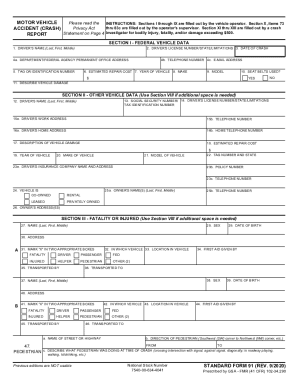
The Washington Vehicle Accident Report is a government form used by state employees to report vehicle accidents involving state vehicles in Washington.
pdfFiller scores top ratings on review platforms




Who needs WA SF 137?
Explore how professionals across industries use pdfFiller.

WA SF 137 is needed by:
-
State employees involved in vehicle accidents
-
Supervisors managing state employee incidents
-
Human Resources departments handling accident claims
-
Insurance representatives processing claims for state vehicles
-
Legal teams reviewing accident documentation
-
Departments of Enterprise Services reviewing accident reports
Comprehensive Guide to WA SF 137
What is the Washington Vehicle Accident Report?
The Washington Vehicle Accident Report, known as Form SF 137, is essential for documenting vehicle accidents involving state employees or state-owned vehicles. This form ensures that all incidents are properly reported, facilitating a streamlined process for state workers and their supervisors. The requirement to submit this form within two working days to the Department of Enterprise Services is crucial for timely claims processing and record-keeping.
By using the Washington State accident form, state employees can adequately document the necessary details of the accident, fulfilling legal obligations and protecting their interests.
Purpose and Benefits of the Washington Vehicle Accident Report
The Washington Vehicle Accident Report serves multiple important functions. It guarantees accurate documentation of incidents involving state employees, ensuring that crucial information is collected and recorded. This report is not only a record of the incident but also facilitates proper claims processing and can be vital in legal proceedings.
By having a legal record of the incident, both the driver and their supervisor can address potential liabilities and follow through on necessary actions post-incident.
Who Needs the Washington Vehicle Accident Report?
The Washington Vehicle Accident Report is required for several key individuals. Drivers of state-owned vehicles involved in accidents must complete this form, along with any state employees participating in vehicle-related incidents. Supervisors who oversee these drivers are also responsible for ensuring that the form is filled out correctly.
Specific state regulations mandate that this report be filed for particular types of incidents, emphasizing the necessity of understanding who is obligated to use it.
How to Fill Out the Washington Vehicle Accident Report Online
To complete the Washington Vehicle Accident Report digitally, users must access the fillable form available through pdfFiller. Here are the steps to guide you through the process:
-
Navigate to the pdfFiller website and locate the Washington Vehicle Accident Report.
-
Open the fillable form, ensuring you have the necessary details on hand.
-
Fill in critical fields such as accident details, vehicle information, and driver identity.
-
Double-check the accuracy of the data to prevent delays during processing.
Field-by-Field Instructions for the Washington Vehicle Accident Report
Each section of the Washington Vehicle Accident Report contains critical fields that require thorough attention. Here is a guide to help you understand what information is needed:
-
Date of the accident must be filled in accurately.
-
A detailed description of the accident is required for clarity.
-
Signatures from both the driver and supervisor validate the report.
-
Witness information and damage descriptions add context to the incident.
Common mistakes include omitting key information or failing to secure the necessary signatures, which can cause issues in record-keeping and claims processing.
Submission Methods for the Washington Vehicle Accident Report
Once the form is completed, users have several methods to submit it. The options include electronic submissions and physical drop-off locations. Here are some details regarding submission:
-
Electronic submission can often expedite the process and reduce the risk of delays.
-
Physical submissions must be directed to designated drop-off locations as outlined by the Department of Enterprise Services.
-
Adhering to the two-day submission requirement is vital to avoid possible penalties.
Security and Compliance for the Washington Vehicle Accident Report
Handling sensitive information in the Washington Vehicle Accident Report is critical. pdfFiller employs robust security measures to protect users' data. These measures include:
-
256-bit encryption to secure documents during upload and submission.
-
Compliance with regulations such as HIPAA and GDPR, ensuring data privacy.
-
Assurances that all sensitive information is managed securely throughout the process.
What Happens After You Submit the Washington Vehicle Accident Report?
After submitting the Washington Vehicle Accident Report, users can expect a defined processing timeline. Here's what to consider:
-
Track the status of your report for confirmation of processing.
-
Be prepared for any potential follow-up actions that may be necessary.
-
If any errors are discovered post-submission, corrective actions can be initiated.
Start Filling Out the Washington Vehicle Accident Report Today
Utilizing pdfFiller's online tools can streamline the process of completing your forms. With features that allow users to save, share, and securely manage their submissions, embarking on filling out the Washington Vehicle Accident Report has never been easier.
Take the first step to ensure your incident is documented accurately and efficiently by accessing the form today.
How to fill out the WA SF 137
-
1.To begin, access pdfFiller and search for 'Washington Vehicle Accident Report' or navigate directly to the template section. Ensure you have an account, or create one if necessary.
-
2.Once opened, familiarize yourself with the fillable fields. The template includes sections for accident details, vehicle and driver information, damage descriptions, and witness accounts.
-
3.Before filling out the form, gather all necessary information, including your personal details, vehicle information, accident details, and any witnesses you may need to report.
-
4.Start filling out the form by entering your name, contact information, and the date of the accident. Follow the prompts for additional details, using checkboxes and blank fields.
-
5.For vehicle and driver information, ensure accurate details are filled in to avoid processing delays. Double-check the damage descriptions to be clear and precise.
-
6.Review your entries carefully before finalizing the form. Use pdfFiller's review feature to ensure all fields are complete and correct.
-
7.Once verified, choose to save your document either on your device or within pdfFiller. You can download a copy or submit it directly through the platform to the Department of Enterprise Services.

Who needs to complete the Washington Vehicle Accident Report?
The form must be completed by state employees involved in vehicle accidents and requires both the driver's signature and a supervisor's verification for processing.
What is the deadline for submitting the accident report?
The Washington Vehicle Accident Report must be submitted within two working days following the accident to ensure compliance with state regulations.
How should I submit the completed form?
After filling out the Washington Vehicle Accident Report, you can submit it directly through pdfFiller or download and send it via email to the Department of Enterprise Services.
Are there any supporting documents needed with this form?
Typically, you may need to provide witness statements or photographs of the accident scene, but specific requirements can vary depending on your agency's policies.
What mistakes should I avoid when filling out the form?
Be sure to double-check all provided information for accuracy, as errors can lead to delays or rejection of the report. Common mistakes include missing signatures and incomplete fields.
What are the processing times for accident reports?
Processing times for the Washington Vehicle Accident Report can vary, but it generally takes a few days before the report is reviewed by the Department of Enterprise Services.
Is notarization required for this form?
No, the Washington Vehicle Accident Report does not require notarization, but it must be signed by both the driver and the supervisor.
WA SF 137 Form Versions
Related Content
Related Forms





Related Catalogs
Get the latest insights from our blog


If you believe that this page should be taken down, please follow our DMCA take down process
here
.
This form may include fields for payment information. Data entered in these fields is not covered by PCI DSS compliance.